GET IT FIXED QUICKER BY CHECKING FOR RECENT KNOWN ISSUES FIRST
We have pinned to the top of our forum some articles giving cures for known issues. The hot one is currently if you see an error regarding BkmxAgent after updating to macOS 11.4.
Otherwise, we can often solve problems pretty quickly if we have can reproduce it with your data, and we are happy to do that. All data we receive is treated in accordance with our Privacy Policy.
Trouble Zipper (Recommended)
The easiest way to send us data is to use our Trouble Zipper. If you have Smarky, Synkmark, Markster or BookMacster installed, you can launch any of those apps and click in the menu Help ▸ Trouble Zipper. It looks like this in BookMacster:
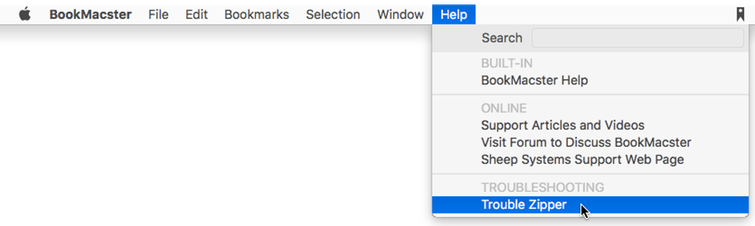
If you can’t get there, you can download Trouble Zipper and then double-click to run the Sheep Systems Trouble Zipper after it unzips.
The Trouble Zipper gathers preferences files and crash reports for Sheep Systems' apps, a mini system profile, any message sent to your system console log which has the name of one of our apps in it, and optionally, Include Bookmarks and Documents. We usually need you to do this if there is an issue with your specific bookmarks. For issues installing or extensions not responding, we usually don’t need it, but if you don’t mind, it is better to Include Bookmarks and Documents.
If you want to redact some bookmarks…
A BookMacster Bookmarkshelf (.bkmslf) file contains all of your bookmarks. If you don't want to send all of your bookmarks, despite our nice Privacy Policy, we can often still find some clues even from a .bkmslf file which has some or all of the bookmarks redacted. To create a redacted version, before running Trouble Zipper
• Editing the Bookmarkshelf in BookMacster, delete the folders or bookmarks which you want to redact. To redact all items, in the menu, click Bookmarkshelf ▸ Delete All Content.
• In the menu click either File Duplicate.
• In the dialog, navigate to your Desktop and save it as a new .bkmslf file.
• Close the Bookmarkshelf window.
• When running Trouble Zipper, when asked to identify troublesome Bookmarkshelf files, choose the redacted version.
If you want to send screenshots…
Although Trouble Zipper is almost always the way to go, in some cases, you may want to send us a screenshot. To take a screenshot on a Macintosh,
• Place your mouse/trackpad cursor at the top left hand corner of the area you wish to “shoot”.
• While hold down the ⌘ and 'shift' keys on your keyboard, type the '4' key.
• Click down, and while holding down, drag over to the bottom right corner of the area you wish to shoot.
• Let go of the mouse or trackpad button. A "Screen Shot" file will appear on your desktop (unless you have changed the hidden system preference to direct screenshots elsewhere).
The Actual Sending
Trouble Zipper will prompt you to upload the result to our Dropbox. You may drop other files in there too. Smaller files (10 MB less, depending on your email provider) may be attached to email to support@sheepsystems.com.