
Recording Music with Olympus LS-P4
The Olympus LS-P4 voice recorder is capable of really high quality recording if properly configured. This explains how to do that.
In our church, the built-in SCENE = MUSIC would be OK for most English Masses, but I don't use that because for Hispanic Masses using this scene results in a few dB of clipping in music such as cumbias with hard driving bass. Fortunately, the LS-P4 will remember all settings, including the recording level Volume number. So if you always record in the same way, you only need to do the following once.
Turn on the third (central) mic
The LS-P4 is capable of quite flat frequency response over the audible spectrum, but to get the bass end you need to use all three microphones – the tres mic feature.
Push button MENU.
Push DOWN button once to get to Rec Menu.
Push RIGHT button once to select it.
Push DOWN button a five times to get into Mic Select.
Push RIGHT button again to get into select it.
Push UP or DOWN button to get to Central Mic.
Push RIGHT button to select it.
Goodbye to Delicious, aka del.icio.us 2
The Delicious, aka del.icio.us bookmarking service has undergone several ownership changes, and during the last year the site has often been not working. Last year at this time, we were fielding support requests from Delicious users. After testing, we responded by saying Yes, it looks like Delicious is down again. There is of course nothing we can do to fix that.
We’ve now learned that, indeed Delicious is gone.
Jerry Krinock
New File Format in the BookMacster Family
Version 2.5 of Smarky, Synkmark, Markster and BookMacster introduces a new document file format, replacing the old Bookmarkshelf document (.bkmslf file) with a new Collection document (.bmco file package). Note: BookMacster users may have more than one document file. Synkmark, Markster and Smarky only support a single document file, which appears as its “main
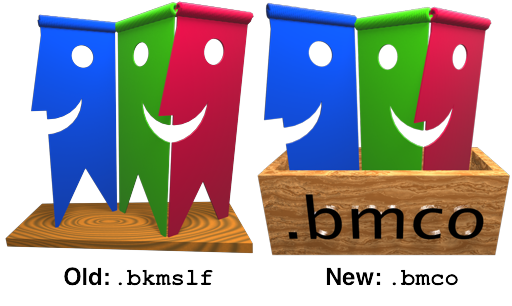
A .bkmslf file opened in version 2.5 or later will automatically be deleted from the disk and replaced with a new .bmco file package. For BookMacster, if it resided in the default Bookmarkshelf Documents folder, the corresponding .bmco file will reside in a new Collections folder. Like the old Bookmarkshelf Documents folder, the new Collections folder also resides in ~/Library/Application Support/BookMacster/.
The new file format plays nicer and more efficiently with recent versions of macOS. It is a file package instead of a flat file, its SQLite store now supports write-ahead logging. Instead of using Apple’s notoriously problematic NSPersistentDocument, it is based on BSManagedDocument. It has adopted Apple's asynchronous saving.
Status Items (aka Menulets) Get Keyboard Access in 10.12 2
My thanks to whomever it was at Apple who decided, in macOS 10.12 Sierra, to fix Bug 15499730 which I filed almost three years ago, in 2013 on Nov 18!
This bug involves the non-Apple Status Items, colloquially called menulets, which appear in your menu bar to the right of center, provided by non-Apple applications, such as our bookmarks management apps.

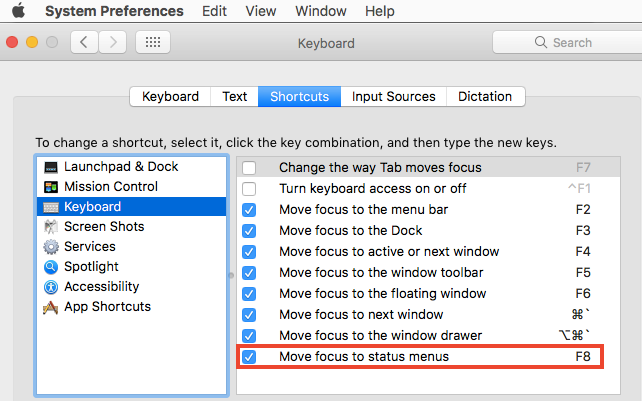
Until macOS 10.12 Sierra, the only way for a user to access these was by clicking them with the mouse, which was difficult for users with limited vision, and annoying for those of us who feel we work faster with the keyboard. If you enabled a Keyboard Shortcut to to Move focus to status menus, as shown in the screenshot below, you could use your arrow keys to access the (Apple) Menu Extras, but not the (non-Apple) Status Items. But after upgrading to macOS 10.12 Sierra, it works for the Status Items too. Markster users, and BookMacster users, who use our Status Item to land new bookmarks directly, will appreciate it!
Jerry Krinock
How to Install an Older macOS
As a developer, of course I always anxiously upgrade to the lastest beta macOS, forgetting that I’ll need to keep the older one around for testing our apps. Then, I need to install an older macOS on a different partition. The challenge is that, if you do the obvious thing and launch the “Install <earlier version>” app, a dialog will appear and tell you This copy of the ‘Install OS X/macOS’ applications is too old to be opened on this version of OS X/macOS – Quit. Arghhh. The following instrucions will work around that.
First of all, understand that it is definitely necessary to have three volumes to do this. A “volume” is a disk “partition”.
Volume N - The volume with the new version of macOS which you are currently running.
Volume T - A “trampoline” volume which will become your bootable installer. This volume must be only big enough to hold the installer. This Volume T will be comnpletely erased during this process. I used a 8 GB thumb drive for Volume T.
Volume D - The destination volume which is where you want the older version of macOS to be installed
Note that these three volume/partitions may or may not be on the same disk.
If you try to use one volume for T and D, everything will proceed OK until it inexplicably tells you that your disk image is damaged and you should redownload from Apple, which will not help.
Safari Bookmarks not being “pushed” in iOS 9
UPDATE (2016-Feb-15)
This problem is no longer reproducible. For the last few weeks, iCloud Safari bookmarks syncing has been working OK for me. However, I don’t test it every day.
SHORT VERSION WITH WORKAROUND
In order to see recent bookmarks changes made on other devices in Safari on your iPhone or iPad running iOS 9, you must relaunch Safari (double-click the home button, then in the application switcher which appears, flick the Safari tile upward, then relaunch Safari).
This seems to affect all Safari users, whether or not you are using BookMacster, Synkmark or Smarky. The same behavior occurs if you change bookmarks directly in Safari, as explained below. We reported this as a Bug 22932240 to Apple on 2015 Oct 01, as follows:
SUMMARY
In iOS 9, when using iCloud Safari syncing, Safari bookmarks are not pushed from iCloud automatically, no matter how long you wait. They don't show up until you forcibly relaunch Safari. This was tested most recently in iOS 9.0.1 (Build 13A404).
STEPS TO REPRODUCE
Bicycle Helmet gets “Used"
I’ve often said that helmets serve no purpose when you’re riding a recumbent bike like my Tour Easy, because you’re highly unlikely to go flying head first, as commonly occurs when something bad happens to an upright bike. Well, it turns out that is wrong. Riding about as fast as I could on my steel Tour Easy (maybe 15 miles per hour at my age of 58), northbound on Sunol St., north of San Carlos St. in San José on Sunday 2015 April 19, I felt my front end lift up, and then a second later collapse under me. Next thing I knew, my helmet bounced off of the asphalt, on the right side just above the visor. Wow, this would have been a serious head injury. (It was the first time that I’d ever “used” a bicycle helmet.)
The accident was due to a quite high ridge in the pavement that runs parallel to the direction of travel. The only damage to me or my bike was a slightly sore shoulder that went away after a day, a loosened rear view mirror, which was kind of loose even before that, and another tear in the light cloth that I have clipped over my fairing to protect it from scuffs and degradation by sunlight.
Have you ever done Auto-reverse engineering?
auto-reverse engineering |ɔdoʊ riˈvərs enjəˈni(ə)riNG|
A type of engineering work inspired by its progenitor, reverse engineering, which, as is well-known, describes the action of a company disassembling a competitor’s product in order to figure out how it works and learn some tricks. Auto-reverse engineering is the action of a company disassembling its own product, because its design was never documented, and the engineers who designed it have moved on.
Building with 10.6 SDK in Xcode 6 - Still works!
A job I’m working on requires that the customer's massive old project be built with the 10.6 SDK. After spending a few minutes with Xcode 3, I was thinking of walking out the door. Actually, it was more than a few minutes – I watched Xcode 3 beachball for eight and a half minutes doing a Find in Project (not frameworks, just Project!). I remembered the bad old days.
But then I also remembered how, years ago, I’d copied the 10.5 SDK into Xcode 4, I think when I needed to build Bookdog. I remembered there were some issues, though, and eventually it was no longer possible. Realizing this was a much bigger stretch, in desperation I tried it again. I copied the 10.6 SDK from an Xcode 3 installation to Xcode 6.1 as described in this Stack Overflow article Amazingly, after 15 minutes of “indexing”, Xcode 6.1 Build Succeeded on this massive project, including CodeWarrior PowerPlant, using the 10.6 SDK, and the product launched and it works. Hey, I got 999+ warnings, but they were supposedly getting 700+ in Xcode 3.
Hmmm, there were probably fewer issues with this than with Bookdog and 10.5, because back then we were dealing with the PowerPC thing and different gcc versions.
Something I don’t say very often: Thank you, Apple, for not breaking this unsupported hack.
I might recommend still doing the final production build in Xcode 3 on the old Power Mac, but at least now I can develop.
Loading Apple frameworks with @rpath in 2015
A very good old blog post by Mike Ash and one by Dave Dribin explain the history behind @rpath. But today, we can forget the sordid history. To use @rpath, simply make the following Build Settings:
• In the framework target that needs to be loaded, set Installation Directory to @rpath. (*)
• In the target that needs to load the framework, add to its Runpath Search Paths the relative path from the its executable, which in this context is called the loader, to the framework, denoting the starting point by the symbol @loader_path. It makes sense if you think about it! For the typical example of an application executable in Contents/MacOS which needs to load a framework in Contents/Frameworks, the answer is: @loader_path/../Frameworks.
* It seems to me that the example Apple’s Dynamic Library Programming Topics > Run-Path Dependent Libraries > Using Run-Path Dependent Libraries, which says to use @rpath/MyFramework.framework/Versions/A/MyFramework, is either wrong or confusing.
Four Ducks, Very Sad

Four ducks perch on the bank of one of the ponds in the Oakdale / Farmer's Creek wetland in Lapeer, Michigan. A couple weeks ago, the geese left the area and for the last week or so, dozens of ducks like this were happily swimming and doing duck things in this pond, until a couple days ago when the temperatures became colder, rather early in the season, according to the local people I talk to.
Today, you can see to the left of these four remaining ducks is the one small still-shimmering section of the pond which has not yet skinned over with ice. It is about 15:15 in the afternoon on Sunday, 2014 Nov 16. Overnight, this small section will certainly become skinned with ice also, and with temperatures predicted to average -5 Celsius from Monday night thru Friday, the whole surface will be frozen hard.
I wonder what the ducks are thinking.
Weird Email from Dropbox saying my Dropbox app is out of date 2
This happened Saturday, 2014 Aug 16.
• I received an email allegedly from Dropbox.
• It says my Dropbox app is out of date.
• Strange, because the Dropbox app updates itself, silently and automatically.
• I check my Dropbox version. It is Dropbox 2.10.27. Is this the latest, I don't know?
• By the way, I have Mac OS X 10.10 Yosemite DP5.
• The email (HTML) contains an "Update" button anchored to:
https://www.dropbox.com/l/D597IVhchBlArC6GhlySxq/
• That looks legitimate.
• So I click the button. A web page opens, a download begins, disk image decompresses, Dropbox.app appears.
• I double-click the decompressed Dropbox.app. Gatekeeper (Apple security feature built into OS X since late 2012) pops up a dialog, tells me that app is not allowed to launch because it is from an unidentified developer. Eeek!
• I check the version of the decompressed app, (Contents/Info.plist). It says that it is version 1.0. Well, definitely that explains why it would not have been signed for Gatekeeper, if it is indeed Dropbox 1.0 which was published in 2010. But it also would definitely not be an update from my current version 2.10.27.
Advanced iOS/Objective-C/Swift Meetup, Sunnyvale CA, 2014 Sep 09
Follow-up resources regarding my talk to the Advanced iOS/Objective-C/Swift Meetup at Sandbox Suites in Sunnyvale, California, the evening of 2014 Sep 09. Thank to all who attended!
Jerry Krinock
The project I showed to demonstrate Core Data Concurrency.
The High Level View
Brent Simmons’ 2010 blog post On Switching Away from Core Data
Tim Roadley's Ten Mistakes People Make with Core Data
From Apple
Apple's Core Data Programming Guide
Apple's Technical Q&A 1809 on Write-Ahead Lookup Journaling, added in OS X 10.9 and iOS 7, which causes Core Data persistent store files to be three files instead of one, and how to work around it or revert to the old behavior.
Transcript of WWDC 2014 Session 225, What’s New in Core Data Reading a searchable transcript on a technical topic is so much more efficient than watching a video! Even if someone gives you a time marker in the video. However, you might want to watch the video too. It looks like there was only this one Core Data Session this year.
Open-Source Tools and Libraries
Matthew Morey’s Top 10 List of Core Data Tools and Libraries. Number 2 in the list, mogenerator, contains some instructions for using mogenerator.
Wolf Rentzsch’ mogenerator, a tool for generting Core Data model classes. Version 1.27, the current built binary download, does not support Swift, but supposedly the current trunk does and presumably 1.28 should.
Xcode Messes with Time Machine … too much
Watch out if you are using Xcode for non-Mac-App-Store builds. It may exclude more than you realize from Time Machine.
In the following experiment, I configured Xcode to build Smarky two levels up from the project directory, into a directory named Builds2. The app target’s Build Settings > Build Locations looks like this…
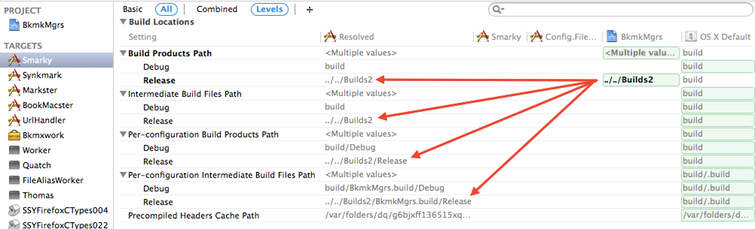
As you can see, this setting was propagated into the Intermediate Build FIles Paths too.
Next, I deleted the Builds2 directory (if any), so that we are starting over from scratch. Then, I executed a Release build (using xcodebuild). Here is what it produced…
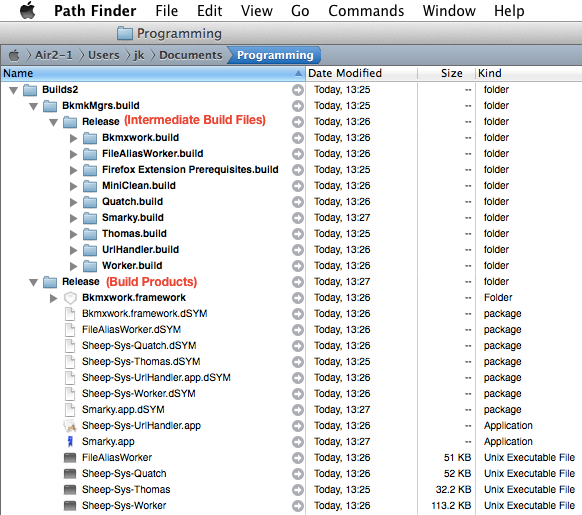
To the “naked eye”, all looks as expected.
But wait. Let’s look at these directories' pesky Extended Attributes.
As expected and desired, because it contains garbage, the Intermediate Build Files directory has Time Machine exclusions…
Air2:~ jk$ xattr -l /Users/jk/Documents/Programming/Builds2/BkmkMgrs.build
com.apple.XcodeGenerated: Yes
com.apple.metadata:com_apple_backup_excludeItem:
00000000 62 70 6C 69 73 74 30 30 5F 10 11 63 6F 6D 2E 61 |bplist00_..com.a|
00000010 70 70 6C 65 2E 62 61 63 6B 75 70 64 08 00 00 00 |pple.backupd….|
00000020 00 00 00 01 01 00 00 00 00 00 00 00 01 00 00 00 |…………….|
00000030 00 00 00 00 00 00 00 00 00 00 00 00 1C |………….|
0000003d
Arranging Apps on the old iPad
Many years ago, when I worked for a company in a cubicle, after one of our many relocations, all of the engineers were busy rearranging our cubicles. You had a desk, a chair, a computer, a file cabinet, usually a storage cabinet and whatever else you wanted which you could “appropriate”. You were free to put these where you wanted. Some people were trying to be innovative, others copied. A wise engineer, older than me at the time, viewed the scene and remarked Yes, it’s hard to figure out the “optimum” arrangement. Maybe stay at home and have them send the check every month. He was great about saying stuff like that with a straight face.
I feel the same way about apps on my iPad Mini, which I use mostly for reading music notation with forScore, but of course it’s a note pad and web browser too. I won’t do email on an iPad because I’m never far away from my MacBook Air, and I can type faster on a real keyboard. iTunes tells me I have 34 apps. I’d rearranged the apps once, “logically”, into three screens, but it never quite made sense. Today I decided it do it like I do my bookmarks - in alphabetical order.
TransformProcessType() : Better but Still Finicky in 10.9 2
(Most of this post originally was published in an Apple Developer Forum.)
I am happy to see that a 5-years longstanding bug in TransformProcessType(), noted by Mike Ash, and earlier by others, has been fixed!
(The bug was that after invoking TransformProcessType to bring a process from the background to the foreground, the foregrounded app would not get the menu bar until after a different app was activated and then the foregrounded app was activated by the user clicking it in the Dock or doing ⌘-tab. Trying to do these activations programatically, as a workaround, experimenting with delays, etc., resulted only in hours of frustration.)
But, for BookMacster, it requires a code change to do this during app launching. BookMacster has a user preference to Launch in Background. The way it works is straightforward: We set LSUIElement to "1" in the Info.plist, then during launch, check the user's preference, and if user wants it in the foreground, TransformProcessType() to foreground type. Prior to Mavericks, this needed to be done early, in the app delegate's -init, or it wouldn't work. Now, it needs to be done later, in -applicationDidFinishLaunching. Here are our complete experimental results …
Interprocess Communication with Google Chrome : 2014
Since Google Chrome (and other browsers based on the Chromium source code, such as Google Chrome Canary, Opera 15+, Maxthon, White Hat Aviabor) will no longer support NPAPI soon, we needed to find a different way for our bookmarks managemenet apps to communication with our Chrome extension. The alternative suggested by the Chrome team, Native Messaging, looks like it will do the job. At least it passed our proof-of-concept test. UPDATE: It is now shipping in the Stable/Production versions of our apps Synkmark, Markster and BookMacster. The architecture looks like this…
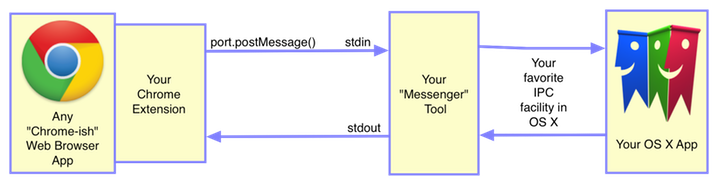
This architecture looks quite similar to how NPAPI worked, except that Your “Messenger” Tool was your NPAPI plugin. It still has two moving parts, but the Messenger has a drastically smaller surface area than the NPAPI Plugin…
• Its size, in our case, is looking to be less than 200 KB, compared to the 2 MB size of our NPAPI plugin, which is based on FireBreath. (I gave up after a couple days of trying to write an NPAPI plugin myself, and found FireBreath.)
• Much as I appreciate the FireBreath product, it was scary to use such a complicated black box which I could barely troubleshoot when there was an issue. You see, I gave up on C++ a decade ago after realizing that I could never learn the new C++ features as fast as the C++ gurus were adding them. Life will be sweet with no more shared pointers, no more Boost library, no more black magic, no more CMake. (CMake is another amazing open source project, one which Firebreath uses to create cross-platform project files for Apple’s Xcode. Unfortunately, since Apple changes Xcode so much and so frequently, it is challenging to keep it working.)
• I no longer need to worry whether or not our NPAPI plugin will work when the Chrome team ever decides to ship a 64-bit version of Chrome for OS X. (A 64-bit developer build has recently appeared for Microsoft Windows.) Of course, it could not be tested until they do. Now, it won't be needed :))
• When our extension is installed into multiple user profiles in Chrome (which can be running simultaneously), each profile launches its own instance of our Messenger tool. Our NPAPI plugin required some careful accounting to avoid “crosstalk" in this case.
• Because whatever goes into ~/Library/Internet Plug-Ins gets loaded into all browsers whether it needs them or not, our plugin uselessly loads itself into Firefox, Safari, etc., where it has no effect other than to waste the user’s RAM, and paste our good name into the Crash Report whenever one of these browsers decides to take a nosedive. Viva isolated processes!
* * *
Here is how the above subsystem seems to work. When user opens the first window in a given Chrome profile, a background.html page in our Chrome extension invokes chrome.runtime.connectNative() with a given host name. Chrome then looks for a special manifest file matching the given host name in
~/Library/Application Support/Google/Chrome/NativeMessagingHosts/
Of course, our extension installer will have installed this file. Most importantly, it contains the path to our new “Messenger” tool, a Command-Line tool written in Objective-C. We’re probably going to install that into our own ~/Library/Application Support folder. Knowing this path, Chrome launches an instance of our Messenger tool.
Chrome communicates with its child messenger via unix stdin and stdout. It seemed like an odd choice for interprocess communication, until I realized that these big-name web browsers need to be cross-platform and run on old systems. They needed something ubiquitous.
In the Chrome-to-Messenger direction, you first open communication via chrome.runtime.connectNative() , which returns a port object that will accept a postMessage() call whose single parameter is a JavaScript object, typically a dictionary. Very nice; you can use the keys in the dictionary like commands, and the values like command parameters. Via stdin, the Messenger receives a JSON serialization of this object, prefixed by a four byte header. The four byte header is one field, the length of the JSON data in bytes.
In the Messenger-to-Chrome direction, your Messenger similarly creates a similar command/parameter dictionary, serializes it object into JSON, (using for example, NSJSONSerialization), encodes it to data as UTF8, then gets the length of the data, prepends it to the JSON, and writes it to stdout. About 9 lines of Objective-C code if you’re verbose like me. Not bad.
Apparently because the background.html is a child of the Chrome user profile and not of a window, communication remains open even after the last browser window of the current user profile in Chrome is closed. (Whew! This behavior is critical for edge-case apps like bookmarks management, that work on the background profile data, unrelated to a browser window.)
When Chrome completely quits, it apparently sends an end-of-file (EOF) to your Messenger. (I can’t see the EOF for sure because NSFileHandle probably swallows it, but I’m guessing this must be what happens.) Anyhow, when your messenger receives an empty stdin from NSFileHandle, it should terminate itself gracefully too. Or you can just wait for the system to kill it due to its parent process (Chrome) terminating.
I’ve noticed one odd but probably harmless behavior and maybe beneficial behavior, which is that if Chrome is running with browser windows open in two different user profiles, and both have our extension loaded and consequently two of our Messenger tools are running, if you quit Chrome without closing the browser windows, then relaunch, two Messenger tools will launch, apparently one for each user profile, even though only one browser window opens (for the last-started user profile). Probably, Chrome re-opens two background.html pages, one for each profile which had a browser window open when Chrome was quit. If browser windows are closed first, then only one Messenger will launch, for the one browser window which opens.
Native Message has a very nice, super-minimalist, low-level protocol. You define your own higher-level protocols with commands and parameters (Use JSON!). The design process is natural, and easily extensible; you can pretty much make it up as you go along.
I think the Chrome team did a nice job on Native Messaging. I just wish they’d done it four or five years ago, so I wouldn’t have had to design in and then design out NPAPI 😩
* * *
Update 2017-03-03. Firefox now uses the Chrome extension system, with this same Native Messaging. Future versions of our Firefox extension will use it.
Safari extensions, unfortunately, still have so few capabilities that we’ve found no reason to bother writing one yet.
“Saving A Document” : Apple Errata
I have more than once reported to Apple that their document section
Document-Based App Programming Guide for Mac
Alternative Design Considerations
Message Flow in the Document Architecture
Saving A Document
has given incorrect information since Mac OS X 10.7 was released in 2011. As of this writing (2013-10-30), it is still incorrect. Let this blog post serve as an errata until they rewrite it.
The section Document-Based App Programming Guide for Mac > Alternative Design Considerations > Message Flow in the Document Architecture > Saving a Document has been incorrect since Lion was released. Some of the errors are obvious - step 4 refers to method
saveToURL:
ofType:
forSaveOperation:
delegate:
didSaveSelector:
contextInfo:
This method is depracated, no longer used and does not appear in the diagram.
But more importantly, the timeline (colored rectangles) along the left side of the graphic indicate that these methods invoke one another in a conventional "stack". But that is not what happens any more. Since 10.7, some of these methods return and only later are the methods higher in the stack (actually more "rightmost" because the time axis on this diagram is downward) invoked by the "perform synchronous activity" magic.
Perl fails @INC (again) after OS X upgrade
After upgrading to Mac OS X 10.9 on my main Mac account today, as happens every time I upgrade Mac OS X, my Perl scripts didn’t work. Again,
Can't locate My/Module.pm in @INC (@INC contains:/Library/Perl/blah, /System/Library/Perl/blah, blah, blah…
Sigh. The problem is that @INC is hard-coded into Perl to contain only system directories, and so the installers for third-party Perl modules that I’ve downloaded from the Comprehensive Perl Archive Network (CPAN) put modules that I need into these system directories, which are wiped by Apple’s installers when you upgrade Mac OS X.
It doesn’t seem to bother the Linux geeks. But in Mac OS X, we try to to keep all of our stuff in our Home directories. (We also don’t like kill several weekends per year reinstalling our systems from scratch.)
Rather than getting them off of my Time Machine disk and installing them back into the same stupid place, this time I put them in my Home directory,
~/Library/Perl/
and also I put all of the modules into that folder directly, foregoing the “5.10”, “5.12”, “5.16” etc. subfolders. It doesn’t make any sense to me that these modules are associated with specific Perl versions. I’m only running one version of Perl, and if I need to update a module, I need to update a module. Old versions of modules, if that’s what those folders are for, don’t do me any good.
Mavericks tried to Repack my Favorites Bar
Got a little surprise today after upgrading to the public release of Mac OS X 10.9 Mavericks, which we hadn’t noticed in Apple’s beta builds.
BookMacster is configured on my Mac account to sync several browsers including Safari. After a few minutes, possibly triggered by my responding affirmatively to take the Mavericks Tour, BookMacster squawked that syncing had been stopped because too many changes were coming in from Safari. Taking a look, I found that, by golly, there were a couple dozen new bookmarks and two folders named News and Popular in Safari’s Favorites Bar (formerly called the Bookmarks Bar). There were bookmarks to Apple, iCloud, Facebook, Twitter, etc.
Apparently what happened is that Apple decided to repack my Favorites Bar with Safari's default bookmarks. These are bookmarks that I don’t want. (If I’d wanted them, I would already have them.) Then, BookMacster’s Safe Sync Limit stepped in and duly did the right thing. BookMacster saw all of these new bookmarks trying to come in, stopped, and told me that something was suspicious.
Sparkle as a Subframework
The Sparkle framework is built with an INSTALL_PATH set to @loader_path/../Frameworks. This works fine when Sparkle is embedded into an app or a plugin, but not if you're embedding Sparkle inside of another framework, as a "sub" framework.
Short Explanation
The short explanation is that @loader_path is referenced to the executable inside the package, so the path from it to its target depends on the directory structure of the hosting app, plugin or framework. The directory structure of a plugin is the same as that of an app, so it "just works", as explained in the ld man page. But a framework is different, so it needs a different path.
Longer Explanation
The INSTALL_PATH of @loader_path/../Frameworks works fine when Sparkle is embedded directly into an application or plugin. In either case, the package looks like this…
Contents
MacOS
MyPlugin (Unix executable)
Resources
Frameworks
Sparkle.framework
because the @loader path is MacOS, the .. is Contents, and Frameworks is, nicely, a subfolder of Contents.
However, embedding Sparkle into another framework is different because of the different directory structure.
How to Stream Audio on the Web
I've recently needed to publish a website with streaming audio and was surprised how difficult it was to find code which would work on all computers, tablets and smartphones in year 2012, and also the number of professionally-designed websites which fail in this regard. The answer appears to be in this W3C Schools article. The short version is: Use HTML5 <audio> backed by mp3 + ogg.
Here is a demo…
However, since the article is pretty old, I tested it on a number of current systems and found that it works in all of them, right out of the box, with no optional plugin installations. Here is what I tested…
• Android (on a smart phone) : The Internet app
• iOS 6 (on iPad) : Safari web browser
• iOS 6 (on iPad) : Atomic web browser
• Mac OS X 10.8 : Firefox 18.0
• Mac OS X 10.8 : Google Chrome 23.0
• Mac OS X 10.8 : Safari 6.02
• Mac OS X 10.8 : Opera 12.11
• Windows 7 : Internet Explorer 9.0
• Windows 7 : Firefox 17.0
• Windows 7 : Google Chrome 23.0
In the code (Show Page Source), please note that you must provide two audio files, .mp3 and .ogg. This is because, for some reason which a mere mortal electrical engineer cannot understand (probably involving patents or not invented here), Firefox (by my testing) and Opera (according to the aformentioned article) cannot play mp3 files. But, lo, they can play ogg files. Conversely, the other browsers seem able to play mp3, but not always ogg. There are other file formats which are supported by various browsers, but it seems that the combination of mp3 + ogg is the smallest combination which will work in all browsers.
Devs: Getting Trouble Data from Users
I spent some time yesterday improving our Trouble Zipper AppleScript package. It now finds crash reports generated by Mac OS X 10.7 and 10.8. (Apparently, we haven't needed to look at many crash reports since 10.7!) Also, using a new Perl script in the package (filterConsoleLogs.pl), the filtering of console log entries for those written only by a target app now gets all lines of multi-line entries.
The AppleScript source, and other useful scripts and tools in the package, are all open for any other interested developers to dig in to. Unfortunately, if your app is sandboxed, you may not be able to allow your users to download and run such a Trouble Zipper from the Help menu in your app, as BookMacster does. But if you can figure out a way to deliver it to your users, you might want to download Trouble Zipper, tear it apart, and use whatever you like.
Oh, but, Apple gave us one more annoying surprise in Mountain Lion. The applet executable in Trouble Zipper's Contents/MacOS/ subdirectory is a triple-fat binary: x86_64, i386, and ppc. AppleScript Editor in Mountain Lion will not open it, apparently because it does not like the PowerPC (ppc) architecture in the applet. And in characteristic Apple oversimplified style, the error dialog simply says that the script cannot be opened. If you don't need to support any more PowerPC users, you can fix this problem by swapping in the applet from any other AppleScript application package you have. Or, you can work around it by opening Contents/Resources/Scripts/main.scpt inside the package, instead of the package itself, and editing that. AppleScript Editor will occasionally give you some crap about not being able to save the file because another app has modified it. Just click Save Anyway. Also, before testing or shipping, you'll need to manually click Compile before Save.
Tree Trimming is Serious Mechanical Engineering
It's been said that all jobs are difficult in their own way. Even though I rarely eat at restaurants, I respect the people who work there. Trimming trees can involve some complicated mechanical engineering, especially in predicting how branches are going to fall when working in urban areas where life and property are at stake. Engineers designing products can run computer simulations and build prototypes before cutting into production. Tree trimmers contemplating a cut like this one that David Henschel did in front of our house yesterday can do neither. You only get one chance, and the only tools available are experience and luck.
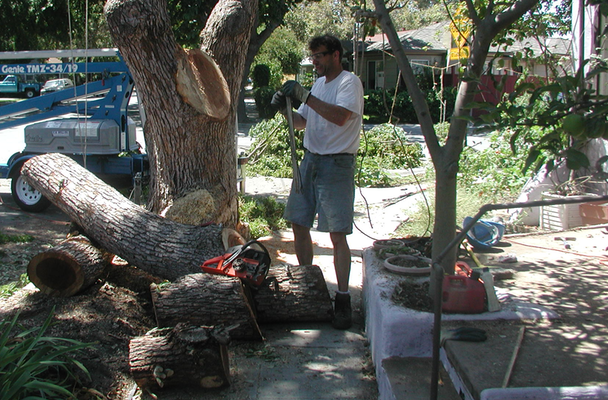
The shorter pieces were cut from the lift, but the long piece, was one cut made from the grouond. Wow. It came down with only a few bent trackers in the chain.
Scroll Different
Because I got the Developer Preview of Lion, I didn't get the warning dialog that most people got about the "new and improved" scrolling direction. For weeks, during the preview, I thought that the upside-down behavior was because of my old Macally trackball. Then I tried an Apple mouse and found that it was backwards too! I couldn't find anything in System Preferences ▸ Mouse. Finally I called AppleCare and was pointed to the checkbox…

What in the world does that mean? After a few seconds I guessed what they meant by content, then activated the engineering side of my brain, and visualized it moving as described. "Oh, oh! Now I get it." Apparently I had skimmed over that checkbox, thinking that since it was so complicated it must not be what I was looking for.
Especially with early versions of BookMacster, people have commented to me that the control names, tooltips and other text "strings" as we call them were too long, too technical and hard to understand. I've been working on simplifying those, trying to be more like Apple. But with this checkbox, I see that Apple is going in the other direction. I told the rep on the phone that the title of that checkbox should have been something more understandable like this…
The #1 Winter Bicycling Slide in San José
When I lived in Warren, Michigan in the 1970s I would rotate commuting by automobile, public bus or bicycle. My safety rule for snow was: No bicycling if more than one inch of fresh snow. During the 1990s I visited Boston and was amazed to see bicyclists older than me commuting in any amount of snow.
But I've learned, more than once, that we have a winter slide here in San José, California too. I've had to, since I no longer own an automobile, and public bus rarely goes where and when I want to. The worst months for it are: November and December. It's fallen leaves mixed with rain. Being aged now, I'm more careful – during our first winter storm(*) a few weeks ago, I was actually too careful and skidded down while stopping for a motorist coming out of a driveway who had probably already seen me and was waiting. Thanks to Easy Racer's recumbent bicycle technology, I only got a skinned elbow that was very sensitive for a few weeks, instead of another broken collar bone. No incidents occurred during my commute to or from the Haines Swim Center in Santa Clara this morning.
View Comments